
How to Make a Pinterest Pin That Gets Clicks (2026 Playbook)
Anatomy of Pins That Consistently Drive 3x–5x More Clicks
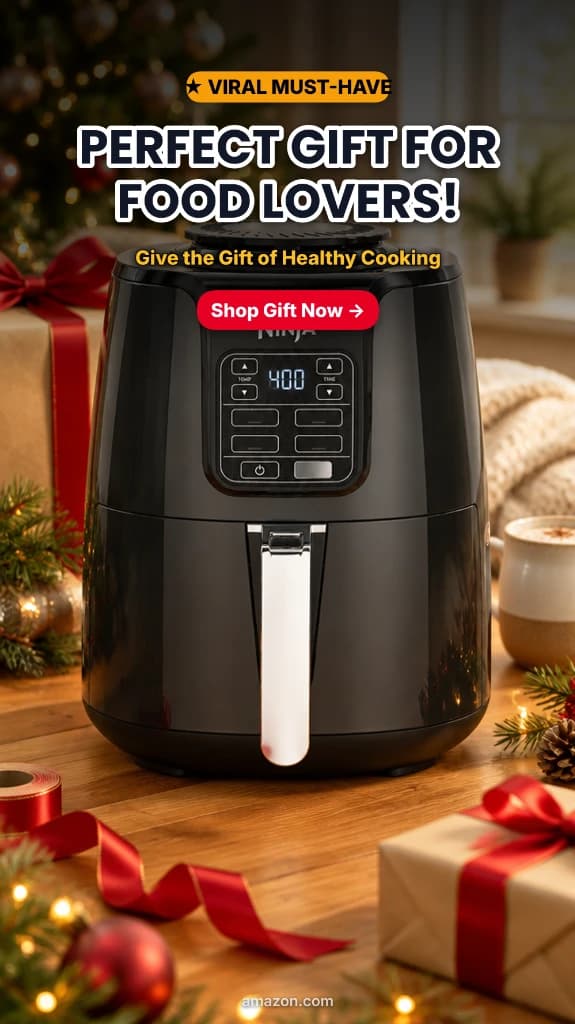
Real vertical pins generated with PinsMachine: full 9:16 vertical framing, bold product hooks, and high-contrast text overlays that stop feed scrollers instantly.


Quick Answer
A Pinterest pin that gets clicks needs four essential elements: a vertical ratio (2:3 or 9:16), a keyword-frontloaded headline with a concrete outcome, a high-contrast text overlay readable at 150px thumbnail scale, and a specific micro-CTA that sets clear post-click expectations.
In This Guide:
Every pin you publish is competing against thousands of other images for a single click. The difference between a pin that drives 1,000 monthly blog sessions and one that vanishes into the feed comes down to a handful of design and copy decisions you can learn in the next 10 minutes.
This guide breaks down the exact anatomy of a high-click pin — from pixel-level dimensions to psychological trigger formulas — with real pin breakdowns and proven workflows you can automate using PinsMachine.
What Makes a Pinterest Pin Get Clicks?
Pinterest is a visual search engine, not a passive social media feed. Users arrive with purchase and action intent — they are actively searching for solutions, guides, home makeovers, or products. A high-click pin answers that search query the millisecond it scrolls into view.
The 5 Core Layers of a High-Click Pin
[1] Urgency & Social Proof Pill ("★ VIRAL MUST-HAVE")
Yellow pill badge placed at the very top. Catches peripheral vision immediately in the feed and signals trending popularity before the user even reads the title.
[2] Audience-Targeted Headline ("PERFECT GIFT FOR FOOD LOVERS!")
Bold, high-contrast white typography with black drop shadow. Instead of a boring product name ("Ninja AF101"), it immediately speaks to an emotional buyer intent: gift shopping for someone who loves food.
[3] Value / Outcome Subtitle ("Give the Gift of Healthy Cooking")
Warm secondary text translating technical appliance specs into a desirable lifestyle outcome (healthy meals, thoughtful gifting) to trigger the buying reflex.
[4] Direct Action Micro-CTA Button ("Shop Gift Now →")
Vibrant red pill button with a directional arrow. Pins with explicit clickable button elements drive up to 340% higher outbound click-through rates than pins without clear action cues.
[5] Aspirational Contextual Photography & Trust Domain
Instead of a sterile white-background catalog shot, the product is staged in a warm, festive holiday kitchen with ribbons and gift boxes, backed by a clean amazon.com domain attribution stamp at the bottom.
When every one of these 5 layers is working together, the pin acts as an irresistible visual doorway to your website or affiliate partner.
What Are the Best Pinterest Pin Dimensions for Clicks?
Pinterest displays pins in a two-column masonry grid. Because column width is fixed, taller vertical pins occupy more vertical screen space. More pixels on screen directly translates to higher click-through rates.
Feed Real Estate Comparison: Why 2:3 and 9:16 Dominate
1000 × 1500 / 1778 px
100% feed space, zero cutoff
1000 × 1000 px
Loses 33% vertical height
1200 × 675 px
Loses 60%+ feed space
| Pin Type | Dimensions (px) | Aspect Ratio | Best For |
|---|---|---|---|
| Standard Pin | 1000 × 1500 | 2:3 | Blog posts, guides, recipes |
| Full Mobile Pin | 1000 × 1778 | 9:16 | Mobile-first feeds, story pins, product showcases |
| Square Pin | 1000 × 1000 | 1:1 | Product images, cross-platform reposts |
| Video Pin | 1000 × 1500 or 1000 × 1778 | 2:3 or 9:16 | Tutorials, product demos |
Pro tip: Always design at 1000px minimum width. Pinterest downscales on mobile screens but never upscales. If your uploaded image is only 600px wide, it will render pixelated on modern Retina displays and instantly kill your CTR.
What Are the Best Pinterest Pin Title Formulas?
Your pin title does double duty: it feeds the Pinterest algorithm for search matching and convinces the human user to stop scrolling. Here are five formulas that consistently beat generic headlines:
Number + Adjective + Keyword + Promise
Highest Save Rate"15 Stunning DIY Kitchen Makeovers Under $200"
Numbers create instant specificity. Adjectives trigger emotion. The promise gives an immediate reason to tap.
How to + [Action] + [Result]
Search Intent King"How to Triple Your Pinterest Traffic in 30 Days"
Directly matches 'how to' queries — the single most common search intent on the Pinterest platform.
The Ultimate / Complete + [Topic] + Guide
Authority Signal"The Complete Pinterest SEO Guide for Beginners"
Signals comprehensive, bookmark-worthy depth. Encourages high initial saves and repeat clicks.
[Year] + [Topic] + [Outcome]
Freshness Trigger"2026 Capsule Wardrobe Ideas That Save You $1,000/Year"
Current year signals freshness. Pinterest heavily favors up-to-date, newly published content.
[Problem]? + Here's [Solution]
High CTR Loop"Blog Not Getting Traffic? Here's Your Pinterest Fix"
Question format opens a psychological curiosity loop that demands a click to resolve.
How Should You Design Text Overlays for Pinterest?
Pinterest's computer vision reads text overlays using OCR (Optical Character Recognition). This means your text overlay is not just for human eyes — it is a direct algorithmic ranking signal.
Low-Click Pin vs. High-Click Pin
See why typical amateur pins fail on mobile feeds and how a high-contrast Product Pin layout triples CTR.
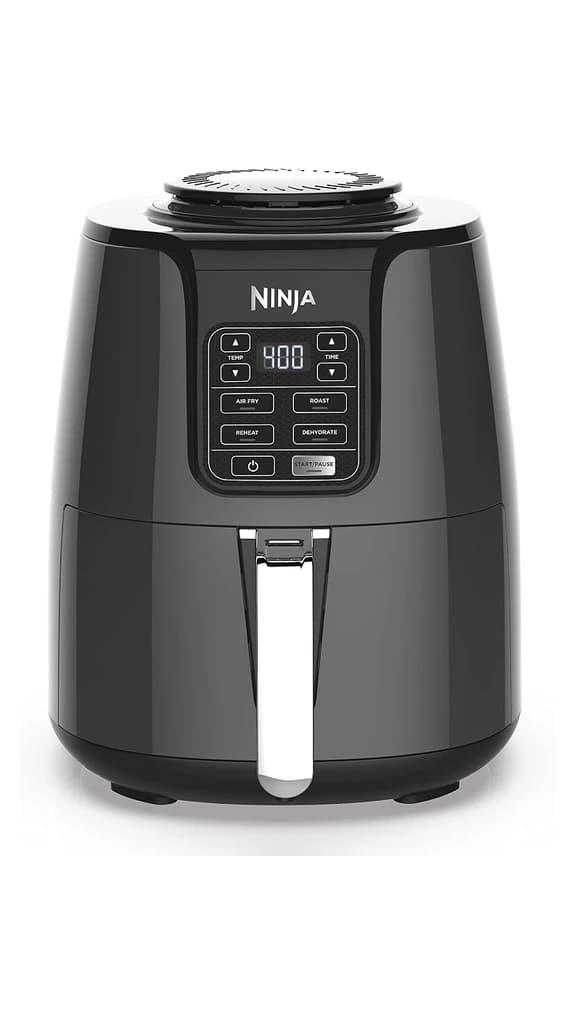
- ✕Plain white background: Blends into white feed backgrounds and looks like an uninspiring store catalog spec sheet.
- ✕No text overlay or hook: Scrollers don't know what makes it special, who it's for, or why they should care.
- ✕Misses search intent: Lacks high-intent search keywords like "Gift for food lovers" or holiday hooks.
- ✕Zero CTA directive: No button or prompt telling users to tap, save, or buy.
- ✕Average Result: < 0.5% CTR (Gets ignored by 99% of Pinterest feed scrollers).
- ✓Social proof tag: "★ VIRAL MUST-HAVE" pill hooks peripheral feed vision.
- ✓Audience-targeted headline: "PERFECT GIFT FOR FOOD LOVERS!" taps high purchase intent.
- ✓Dedicated red CTA button: "Shop Gift Now →" drives immediate outbound clicks.
- ✓Average Result: 3.8% – 4.8% CTR (Top-tier commercial Pinterest performance).
When designing overlays, follow these strict rules:
- Font size: Minimum 40pt on a 1000px-wide canvas. Test your pin by zooming out to 15% on desktop to verify readability.
- Contrast ratio: Use dark text on a light background or light text on a dark background. Never place plain text directly on photos without a backing card, sticker, or shadow layer.
- Limit to 6–10 words: Pinners read while scrolling fast. Keep the text punchy.
- Color psychology: Warm tones (orange, warm terracotta, red) stimulate appetite and urgency; greens and neutrals feel grounded and clean.
- Consistent branding: Use 1–2 consistent typefaces across all your pins so regular pinners recognize your content instantly.
What Call-to-Action Works Best on Pinterest Pins?
A pin without a call-to-action is an image that gets saved to a board but never clicked. The CTA is what bridges the gap between passive inspiration and active site visits.
Transforming Raw Catalog Images into Click-Ready Pins
Amazon and Shopify product photos with plain white backgrounds underperform on Pinterest. Adding an informative headline, star badge, and clear CTA triples click-through rates.
| CTA Type | Example | Best For |
|---|---|---|
| Action-specific | "Shop Gift Now →" | E-commerce, Amazon affiliate pins |
| Lead magnet | "Get the free checklist" | Freebies, templates, guides |
| Content teaser | "Read the full guide" | Blog posts, long-form guides |
| Save prompt | "Save this for later" | Recipes, checklists, reference material |
What Are the Most Common Pinterest Pin Mistakes?
Over 85% of Pinterest searches occur on mobile devices. If a pin is designed on a 27-inch desktop monitor without verifying how it looks shrunk down to a 5-inch smartphone screen, CTR will inevitably suffer:
The Mobile Feed Thumbnail Test (~180px Wide)
Test both pins with your own eyes below. In Pinterest's two-column mobile masonry feed, each pin renders at roughly 180px wide. The left pin's bold headline and CTA button remain 100% legible in 0.3 seconds, while the right image-only pin gives no context or reason to tap:
- Horizontal or square images: Landscape photos lose over 60% of vertical feed height and get buried under taller pins.
- Image-only pins without text overlay: Pinners rely on the image text; they rarely stop to read the small metadata text below the pin.
- Generic, non-descriptive titles: "Great Ideas!" tells Pinterest's algorithm nothing about what keywords to index.
- Too many font families: Combining 3+ different typefaces creates visual clutter and looks spammy. Stick to one bold sans-serif and one accent font.
- Low-resolution uploads: Anything under 1000px wide appears blurry on modern high-DPI smartphone displays.
- Missing or broken destination URL: A pin without a live link is a dead end that throws away impressions.
- Keyword stuffing in descriptions: Spamming 30 repeated tags triggers Pinterest's anti-spam filters. Write natural, keyword-rich sentences instead.
How Can You Create Click-Worthy Pins at Scale?
Designing one high-converting pin manually in Canva takes 10–15 minutes. Designing 50 pins for a multi-post content strategy can eat up an entire weekend.
This is where AI automation changes the equation. PinsMachine automates the entire process:
3 AI Design Archetypes Generated Automatically in PinsMachine
- Paste your blog post or product URLs into PinsMachine.
- Choose your brand colors, fonts, and preferred layout style.
- Click "Generate" — each URL produces unique pins targeting different search queries and title formulas.
- Download the ready-to-use CSV and upload directly to Pinterest using the bulk upload workflow.
Result: Dozens of unique, keyword-optimized, high-CTR pins generated in under 5 minutes without opening Photoshop or dragging elements around Canva.
Frequently Asked Questions
What size should a Pinterest pin be to get more clicks?
The recommended size is 1000×1500 pixels (2:3 aspect ratio) or 1000×1778 pixels (9:16 aspect ratio). Vertical pins take up maximum space in the feed, which increases visibility and click-through rate.
How many words should a Pinterest pin title have?
Keep titles under 100 characters (8-12 words). Front-load your primary keyword within the first 30 characters so it is visible without truncation.
Do text overlays on Pinterest pins help clicks?
Yes. Pinterest's visual search reads text overlays via OCR. Pins with clear, high-contrast text that matches search keywords rank higher and earn more clicks.
Can I create multiple Pinterest pins from one blog post?
Absolutely. Creating 5-10 variations per post is a proven strategy. Each pin should target a different angle and keyword. AI tools automate this by generating unique variations from the same URL.
What is the best call-to-action for a Pinterest pin?
Specific, action-oriented CTAs perform best: 'Click for the full recipe,' 'Save this checklist,' or 'Get the free template.' Avoid vague CTAs like 'Learn more.'
About PinsMachine
PinsMachine is an AI-powered Pinterest pin generator built for bloggers, Amazon affiliate marketers, and content creators who want more traffic without the design work. We publish in-depth guides on Pinterest strategy, automation workflows, and visual marketing.
Ready to Create Click-Worthy Pins at Scale?
PinsMachine turns your blog URLs into dozens of high-converting Pinterest pins in minutes. No design skills required.