
Best AI Pinterest Pin Generator Tools Ranked by ROI (2026)
In This Guide:
If you are still designing Pinterest pins one by one, you are losing hours every week and leaving a significant amount of traffic on the table.
The most successful Pinterest creators aren't grinding through Canva every Sunday. In fact, many are learning how to generate Pinterest pins without Canva to automate the entire process, producing 200 scroll-stopping, SEO-optimized, fully branded pins in minutes.
In this guide, you will learn exactly how AI pin generators work, what features actually matter for growth, and why PinsMachine has become the go-to platform for 330+ bloggers and content creators who take Pinterest seriously.
What Is an AI Pinterest Pin Generator and How Does It Work?
Quick Answer: What does an AI Pin Generator do?
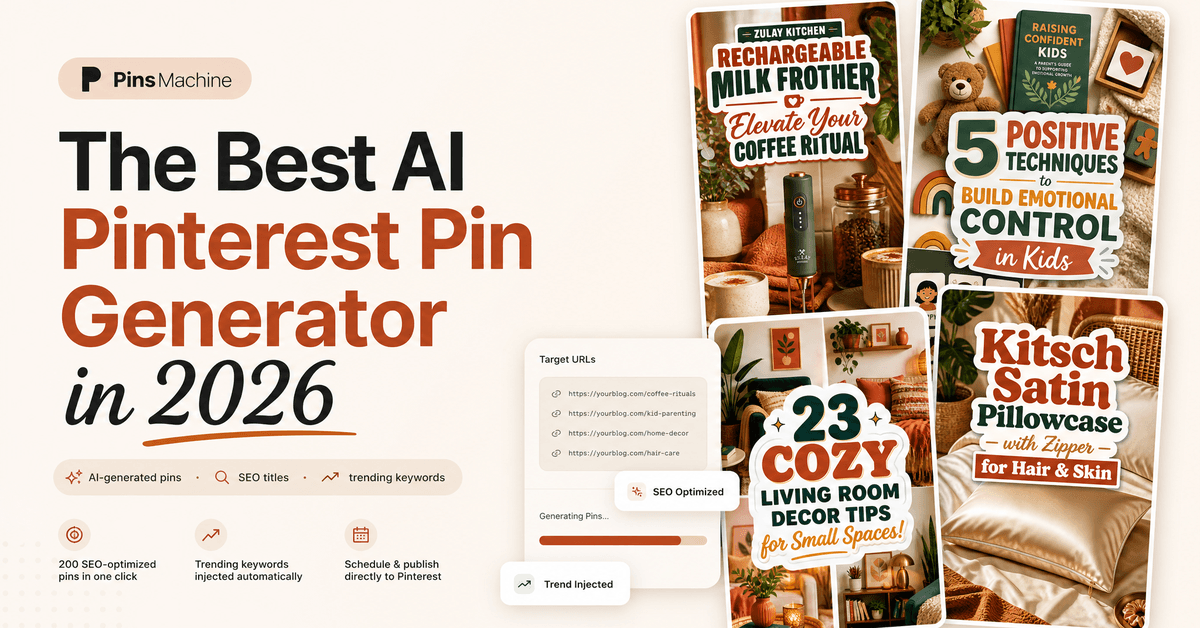
An AI Pinterest pin generator is an automation tool that turns blog post URLs or product links into highly optimized Pinterest pins (complete with professional visual overlays, SEO titles, descriptions, and trending tags) in under 5 minutes without requiring manual design.
Instead of building each pin from scratch, you provide your blog URLs and the AI handles everything automatically:
- Content Analysis: Using automated Blog to Pin technology, the AI reads and analyzes your blog content to extract core messages.
- Visual Generation: It produces beautiful, niche-matched visual templates tailored to your brand with strategic keywords found via our free Pinterest Keyword Generator.
- Copywriting Engine: It generates high-converting, keyword-optimized titles and descriptions.
- Pinterest SEO Integration: It pulls and inserts real-time trending keywords from the Pinterest API.
- Scheduling or Exporting: You can schedule posts directly to your boards or export them in a native bulk CSV.
The result is simple: hundreds of high-quality, branded pins published to the right boards in the exact time it used to take you to make just five pins.
Why Should You Automate Pinterest Pin Design Instead of Doing It Manually?
Let's look at the honest math of manual pin creation. Designing a single high-quality Pinterest pin manually takes anywhere from 5 to 15 minutes when you factor in sourcing a visual, compiling text layouts, researching relevant search phrases, and scheduling the upload.
For a modest output of 50 pins per week, that adds up to 4 to 6 hours of repetitive work every single week.
Because the Pinterest algorithm heavily rewards consistency, you must maintain this grueling pace indefinitely to grow or even preserve your reach. For most busy creators, scaling this manually is completely unsustainable. An automated Pinterest pin creator compresses this entire workflow into minutes without sacrificing brand guidelines or SEO efficacy.
Why PinsMachine Is the Best AI Pinterest Pin Generator for Serious Creators
PinsMachine is not just another generic AI design tool with an export button. It is a dedicated, Pinterest-first automation platform engineered to transform your existing articles and product links into high-performing pins at scale. Here is a comprehensive breakdown of its unique features:
1. Bulk URL Input (Up to 200 Posts)
Paste a batch of blog URLs and the PinsMachine AI will read each article, extract the most relevant core themes, and build contextually accurate pins instead of generic templates. It works flawlessly with WordPress, Shopify, Wix, Squarespace, Ghost, Substack, and custom sites.
2. Integrated Brand Kits for Uniform Styling
Unlike standard AI image generators, PinsMachine protects your brand identity. You define your brand kit once, and it automatically applies your custom brand color palettes and renders your website, social handle, or logo as a watermark directly on the visuals to safeguard your content.
3. Three Versatile Design Modes
- Blog Image + Text Overlay: Matches your blog photographs with professional vertical layouts and optimized typography (16 unique templates, zero Canva required).
- Stock Image + Text Overlay: Searches and matches niche-specific royalty-free photography with stunning text designs.
- AI-Generated Visuals: Creates 100% original, Pinterest-optimized visuals matched to your brand kit palettes.
4. AI Infographic Creator & Pinterest Trend Injection
PinsMachine automatically generates 5-step visual infographics (one of Pinterest's highest-converting formats) directly from your article copy. Additionally, it integrates directly with the Pinterest Business API to pull real-time rising search queries and weave them into your titles and descriptions for maximum organic exposure.
5. Smart Multi-Angle Variations & Scheduling
A single article URL generates 6 strategically distinct pin variations targeting different audience segments and emotional hooks. You can schedule these variations directly to your boards over a 15-day or 30-day window to guarantee the consistent publishing speed the algorithm favors.
6. Product & Affiliate Pins Studio (Amazon, Shopify, Etsy)
NEWPaste any Amazon ASIN/shortlink, Shopify product page, or Etsy listing. PinsMachine auto-extracts HD photos and prices, creating 6 safe-zone affiliate pins with viral headlines, watermark branding, and 1-click batch scheduling to Pinterest.
Try the Free Affiliate Pin Generator →Side-by-Side Comparison: Manual Pin Creation vs. PinsMachine Automation
To understand the massive return on investment (ROI) that automated tools provide, let's evaluate how PinsMachine matches up against manual creation methods:
| Metric / Feature | Manual Method (Canva + Scheduler) | PinsMachine Automation |
|---|---|---|
| Creation Time (200 Pins) | 4 to 6 hours of manual labor | Approximately 5 minutes |
| SEO Keyword Discovery | Slow, manual search audits | Automated via Pinterest API Trend Injection |
| Multi-Angle Variations | Requires manual copy designs | Up to 6 unique pin variations per URL |
| Branding Kit Enforcement | Applied manually post-by-post | Automatic styling and handle watermarks |
| Design Skill Barrier | Moderate (requires graphic skills) | Zero prior design experience needed |
| Workflow Publishing | Requires separate upload pipelines | Direct Pinterest API scheduling or bulk CSV |
Real Creator Results: Outbound Click and Save Efficacy
Automated generation doesn't just save you time; it unlocks better algorithmic distribution. Users who replaced their slow manual design pipelines with PinsMachine have documented massive organic traffic surges:
Increase in organic Pinterest impressions within 30 days.
Boost in absolute pin saves across evergreen boards.
Increase in referral clicks driving visitors to blogs.
"I was spending 6 hours every Sunday creating pins. Now it takes me 10 minutes. My traffic went from 2K to 15K monthly viewers."— Sarah M., Food Blogger
"I hate Canva. PinsMachine completely removed my design bottleneck. I paste my URLs, download the CSV, and I'm done."— Elena R., Lifestyle Blogger
Who Will Benefit Most from Using an AI Pinterest Pin Creator?
Pinterest is a powerful visual search database, and scaling content distribution works across any traffic-driven model:
- Niche Site Builders & Bloggers: Easily turn extensive article libraries into high-volume, on-brand pin streams.
- E-commerce & Brands: Promote physical or digital products consistently without investing in full-time designers.
- Affiliate Marketers: Scale seasonal campaign distributions and drive readers to reviews.
- Marketing & Creative Agencies: Drastically reduce client account setup times and manage multiple clients effortlessly.
- International Creators: PinsMachine features native translation support for English, German, Spanish, and French.
PinsMachine Pricing: Start Free and Scale Seamlessly
Whether you are evaluating automated pin creators for the first time or managing high-volume client boards, there is a perfect plan to match your growth strategy:
Free Plan
Start experimenting
$0 / forever- 10 lifetime pin credits
- Basic image templates
- Full CSV export support
Starter
Perfect for bloggers
$15 / month- 200 monthly credits
- Premium AI visual overlays
- Dynamic branding kit builder
- 15-day automated calendar
Growth
For active publishers
$39 / month- 600 monthly credits
- Direct Pinterest publishing
- Full 30-day spread schedule
- Priority email support
How credit spending works: Blog visual overlays cost 1 credit per pin. Sourcing premium stock photography overlays or generating completely original AI art structures consumes 3 credits per generated pin.
5 Expert Tips to Maximize Traffic from Your AI Pin Maker
Volume is only half of the equations when growing on visual search engines. Follow this playbook to ensure consistent compounding growth:
- Set Your Brand Identity Early: Configure your colors, brand font weights, and copyright watermarks once. Visual consistency helps returning users identify your pins instantly in busy search feeds.
- Leverage All Six Copy Angles: Do not just target one query pattern. Since each blog URL creates 6 unique angle templates, let the generator build distinct pins targeting different search behaviors.
- Drip Content Evenly: Resist the urge to publish a massive batch of 200 pins in one day. Space your pins out evenly over a 30-day window. The Pinterest algorithm favors active accounts that post consistently over time.
- Assign Pins to Hyper-Relevant Boards: Rather than dumping all variations into a single board, partition your variations across relevant boards to hit multiple niche categories.
- Refresh Top Evergreen Posts: Run your highest-converting articles through the generator every few months with new stock backgrounds and fresh keyword phrases to sustain traffic momentum.
Frequently Asked Questions About AI Pinterest Pin Generators
Do I need a Business Account to bulk upload pins?
Yes, bulk uploads are natively restricted to Pinterest Business accounts. The process is completely free and takes under 30 seconds to convert your profile inside your settings (refer to the official Pinterest bulk upload guide for step-by-step setup details).
How many pins can I generate and upload simultaneously?
Pinterest's CSV importer easily processes files containing hundreds of pins in one upload. Most publishers generate, audit, and upload batches of 50 to 200 pins to feed their schedules.
How long does processing take after I submit a CSV?
Smaller files (under 100 pins) appear in your scheduled feeds almost instantly. Larger files containing hundreds of assets take between 1 to 5 minutes to import and distribute.
Can I edit my pin details after publishing in bulk?
Absolutely. You can edit the titles, descriptions, target links, or target boards for individual pins directly on the Pinterest platform at any time.
Are non-English languages supported natively?
Most legacy automation tools are restricted to English only. PinsMachine supports native copywriting and localized SEO keyword injection for French, Spanish, German, and English when generating AI images (note that blog image text overlays are currently English-only).
The Bottom Line: Stop Manually Designing Pins and Start Scaling
If you are still manually editing layouts inside Canva every weekend, you are capping your potential growth. Every article you publish should be transformed into a batch of highly optimized pin formats reaching diverse target demographics across multiple languages.
With PinsMachine, the setup workflow is reduced to just a few minutes: paste your blog URLs, let the AI generate branded variations, schedule them directly or download your CSV, and watch your referral clicks expand.
Join 330+ serious creators who have automated their Pinterest pipelines. The free plan gets you started in 60 seconds with no credit card required.
About PinsMachine
PinsMachine is an AI-powered Pinterest pin generator built for bloggers, Amazon affiliate marketers, and content creators who want more traffic without the design work. We publish in-depth guides on Pinterest strategy, automation workflows, and visual marketing.
Turn Every Blog Post Into 10+ Optimized Pins in 5 Minutes
Create search-optimized titles, branded vertical image layouts, and structured description copies containing 5 to 7 high-intent keywords automatically.
No credit card required • Sign in securely with Google • 330+ creators switching this month